
FMP
How to Find Company and Exchange Symbols with FMP and Discover What’s Behind Them
Dec 04, 2025
Every analysis starts with a symbol. Whether you are screening a sector, building a valuation model, or checking fundamental statements, the ticker symbol determines which security you are actually analyzing. A single error in this identifier invalidates your work, leading to inconsistencies in historical and real-time data retrieval.
This guide provides a professional, step-by-step workflow for analysts to efficiently find company and exchange symbols using Financial Modeling Prep (FMP) APIs. We will demonstrate how symbol lookup moves beyond a simple search to become the foundation for accurate data retrieval, competitive positioning, and timely discovery across global markets.
Step 1: Search for a Symbol
The first challenge in symbol discovery is that a ticker is not always unique globally, and company names can be similar. Effective symbol lookup requires the ability to search by partial name, full name, or symbol across various exchanges.
Broad Discovery with Name Search
The most direct way to identify a security is by leveraging the FMP Company Name Search API. This endpoint allows you to type in a company's full or partial name, such as "Apple," to generate a list of potential matches.
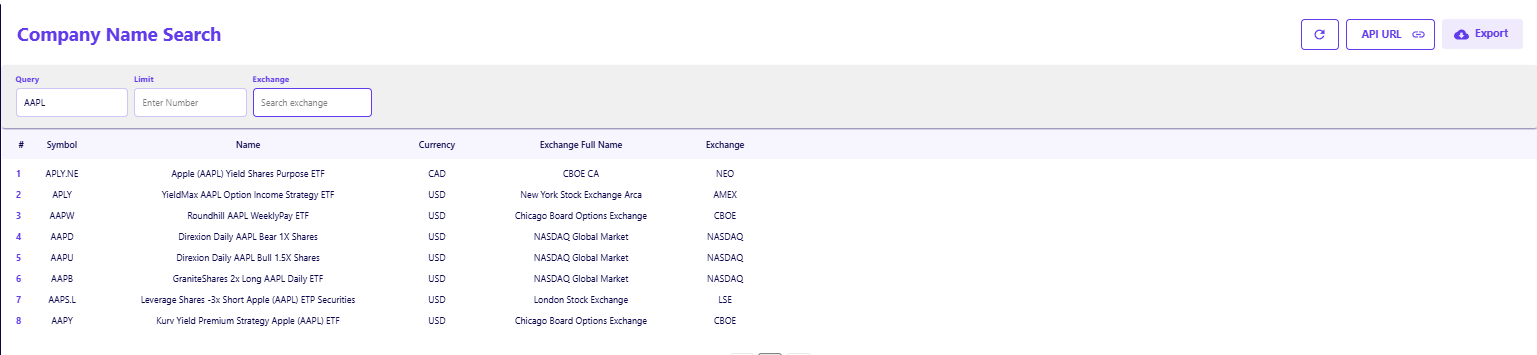
This step is critical for verifying the correct listing because a broad search often reveals related financial products that you might not intend to model. For example, searching for "Apple" returns the primary common stock (AAPL) alongside related ETFs like the YieldMax AAPL Option Income Strategy ETF (APLY). This distinction prevents analysts from accidentally pulling data for a derivative product instead of the underlying equity.
Specific Validation with Symbol Search
When you already have a ticker but need to confirm its details, the FMP Stock Symbol Search API provides the necessary verification. This tool confirms the associated company name and exchange, ensuring that a ticker like "RIO" maps to the correct entity.
Using a specific symbol search is necessary because tickers often overlap across jurisdictions. A query for "RIO" must distinguish between the UK-listed Rio Tinto plc (RIO.L) and the Australian-listed Rio Tinto Limited (RIO.AX). The API output resolves this ambiguity by returning the full name and exchange short code alongside the symbol.
Step 2: Confirm the Exchange and Metadata
After the initial symbol search, the next step is to confirm the specific exchange, currency, and other critical metadata. This context is essential for handling dual listings and different share classes correctly.
Navigating Dual Listings and Share Classes
Many multinational companies maintain dual listings or different share classes, each with a unique ticker and currency. Failing to account for this can lead to retrieving data denominated in the wrong currency (e.g., GBP instead of AUD).
The search APIs return critical metadata fields, including currency, exchangeShortName, and Stock Exchange. A valid workflow involves checking these fields to ensure the symbol matches your modeling currency. For instance, if you are building a USD-denominated model, you must verify that the symbol corresponds to a US exchange (like NASDAQ or NYSE) rather than a local listing in Frankfurt or Tokyo.
Mapping Available Exchanges
To understand the full scope of where a company might be listed, the FMP Available Exchanges API provides a comprehensive list of all global exchanges supported by the platform.
This endpoint helps analysts pre-filter their data pipelines. If your mandate is strictly North American equities, you can use the exchange list to filter symbol queries to only accept results from exchanges like NYSE, NASDAQ, and TSX. The API also specifies the data delay (e.g., real-time vs. 15-minute delay), which is a critical factor when building execution algorithms or high-frequency models.
Step 3: Filter by Exchange, Sector, and Country
Identifying a symbol is only the starting point. True analytical value comes from placing that symbol within its market context. Advanced filtering allows you to isolate companies based on their sector, industry, or index membership.
Filtering by Market Index
Analysts frequently need to benchmark a stock's performance against its specific index peers. The FMP Stock Market Indexes List API provides a directory of global index identifiers, allowing the team to isolate and query index constituents.
By retrieving the symbol for a major index like the S&P 500 (^SP500TR) or the STOXX Europe 600 (^STOXX), you can subsequently query the constituents of that index. This acts as a powerful filter, eliminating the need to maintain manual lists of stocks and ensuring that your peer groups always reflect the current market composition.
Extracting Sector and Industry Metadata
The search results from the previous steps also provide sector and industry fields. Integrating this metadata allows you to quickly segment your universe. For example, after searching for "Shopify" and retrieving the symbol SHOP.TO, the metadata identifies it within the "Technology" sector. You can use these tags to programmatically group symbols, ensuring that comparative analysis (like price-to-earnings ratios) is performed against relevant industry peers rather than the broader market.
Step 4: What a Verified Symbol Unlocks
A successfully retrieved and verified symbol is the single API key that unlocks a vast universe of structured, governed financial data. The true utility of the symbol lookup is demonstrated by the immediate, subsequent analysis the symbol enables.
Once you have verified the security identifier—for instance, MSFT for Microsoft, SHOP.TO for Shopify, or 7203.T for Toyota—you use it as the primary parameter to query specialized data endpoints:
Connecting to the Data Ecosystem
- Real-Time Quotes: The symbol is the input for obtaining the latest quote and price updates. Analysts rely on these streams to inform market data feeds and trading decisions.
- Historical Prices: The same symbol pulls years of pricing history, which is essential for calculating Beta, volatility, and conducting technical analysis. Understanding the nuances between real-time, historical, and intraday data is crucial for model accuracy. The same symbol pulls years of pricing history, which is essential for calculating Beta and volatility.
- Fundamental Data: The symbol retrieves mandated regulatory filings and financial statements (Income Statement, Balance Sheet, Cash Flow).
- Intraday Data: The symbol is the required input for querying high-frequency APIs. For implementation details, check our tutorial on how to get stock intraday data with FMP APIs.
- Key Metrics & Estimates: The symbol allows you to pull key performance indicators (KPIs) like Earnings Per Share (EPS), revenue growth, and consensus analyst estimates.
- Market Classification: The symbol connects to sector and industry classifications, country of origin, and exchange for automated peer grouping.
- Index Membership: The symbol verifies if the security is a current component of major indices, allowing for accurate benchmarking against peers.
This transition from symbol lookup to retrieving structured, validated data ensures consistency across the entire analytical pipeline.
The Value of Data Integrity
Accurate and governed retrieval of company and exchange symbols is the non-negotiable first step in the financial data pipeline. By utilizing structured API endpoints like the FMP Company Name Search API, Available Exchanges API, and Stock Market Indexes List API, analysts ensure their models operate on a foundation of data integrity. This approach reduces manual errors and dramatically accelerates strategic insight.
The next step is to test the output of the symbol search directly. Use a validated symbol to pull its latest Key Metrics and Financial Estimates to see the immediate value of a governed symbol lookup.
Frequently Asked Questions (FAQs)
What is the best API for a beginner to find stock market symbols?
The FMP Stock Symbol Search API is ideal for beginners because it provides a complete, easy-to-use directory of all available tickers with their corresponding company names.
How do I ensure my stock symbol data is always current?
Use an API like the FMP Available Exchanges API to confirm the listing's status and exchange details, relying on its frequent refresh cadence to ensure currency.
Why do some companies have multiple symbols?
Companies may have multiple symbols due to dual listings (e.g., trading on both the NYSE and LSE) or different share classes (e.g., Class A vs. Class B shares). Always check the exchange and share type to use the correct identifier.
What is the difference between searching by symbol and searching by name?
Searching by name using the FMP Company Name Search API is better for initial discovery when you only know part of the company name. Searching by symbol is best for verifying a known ticker and confirming its exchange and full name.
How does symbol accuracy affect market segmentation?
Symbol accuracy ensures that market segmentation grouping by sector, industry, country, or index is correct. A mismatched symbol could place a security in the wrong peer group, leading to flawed comparative analysis.

MicroStrategy Incorporated (NASDAQ:MSTR) Earnings Preview and Bitcoin Investment Strategy
MicroStrategy Incorporated (NASDAQ:MSTR) is a prominent business intelligence company known for its software solutions a...
WACC vs ROIC: Evaluating Capital Efficiency and Value Creation
Introduction In corporate finance, assessing how effectively a company utilizes its capital is crucial. Two key metri...

BofA Sees AI Capex Boom in 2025, Backs Nvidia and Broadcom
Bank of America analysts reiterated a bullish outlook on data center and artificial intelligence capital expenditures fo...